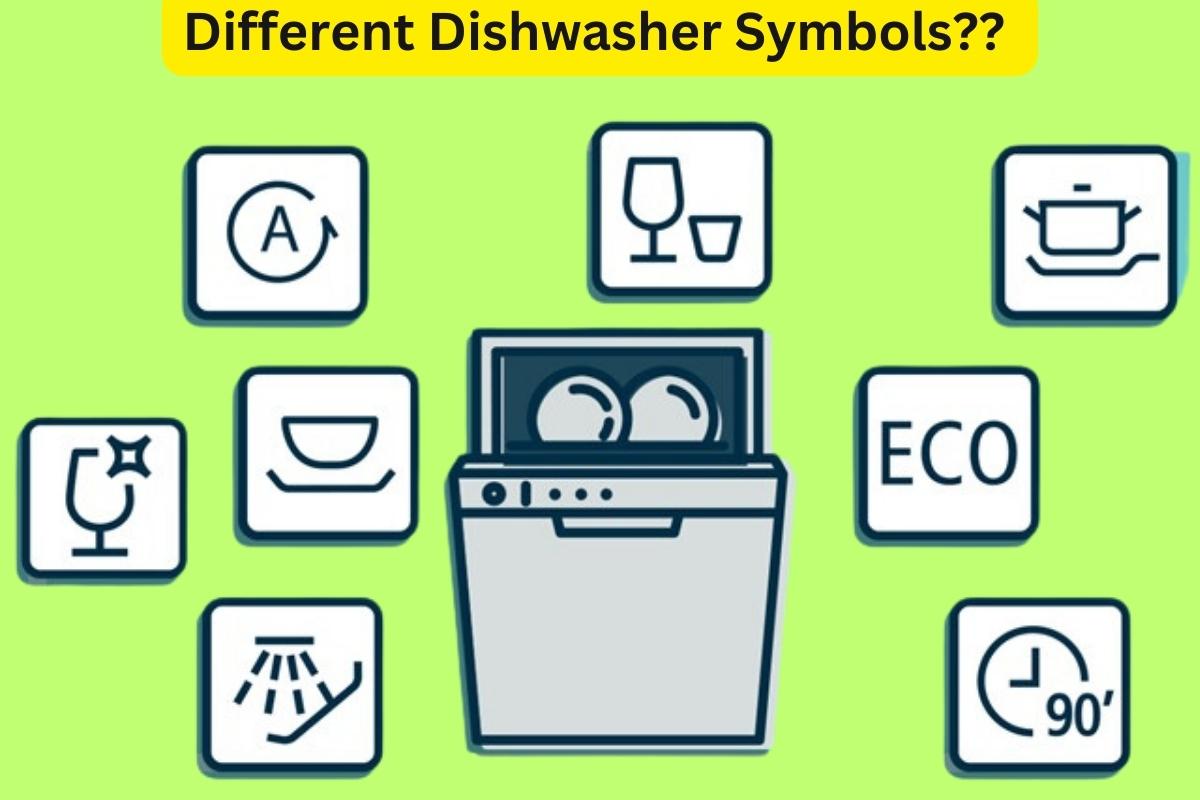
Ever wondered what do the different dishwasher symbols mean…
Although every dishwasher is different, most of the symbols are similar across the different dishwasher brands and models.
In this post, we’re going to explain the different dishwasher symbols and what they mean by using images and icons used by our top 4 recommended dishwasher brands, as listed below:
- Best Table Top Dishwasher – Klarstein Amazonia 6
- Best Free Standing Dishwasher – White Knight DW1460WA
- Best Integrated Dishwasher – Indesit DIF 04B1
- Best Slimline Dishwasher (Free Standing and Integrated models) – Bosch Serie 2 SPS24CW00G / Bosch Serie 2 SPV25CX00G
We’ll also explain the different errors that can be displayed on each of the above dishwashers, and what these warning lights mean.
Table of Contents
Dishwasher Symbols Explained
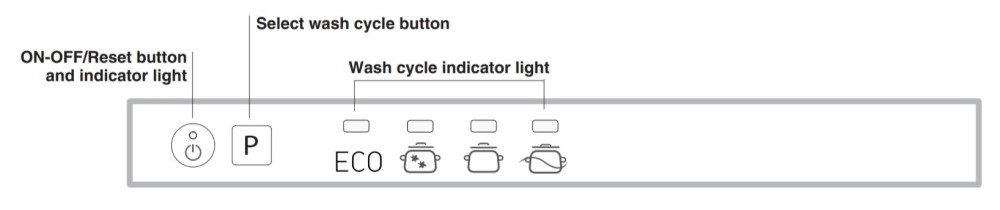
Before jumping into each model, it is easiest to have a quick look at the control panel display for each of the 4 dishwashers we are using as an example, to understand what the difference is between programs, indicators, and other warning type lights.
Have a look at each interface below:



Now let’s dig into each one of those in turn:
Dishwasher Program Symbols
Each dishwasher offers a different range of programs that you can run the machine on, and each program has a specific symbol that represents that program cycle.
The most common dishwasher programs are represented below.
Note: Diagrams and more information on these symbols can be seen for different dishwashers further down in the article.
Cooking Pot/Pan symbol with an additional line below – This symbol may be used to for Intensive programs, which are used for heavily soiled items. They take longer to un and use more energy.
Cooking Pot/Pan symbol – This symbol alone may be used for the Normal/Standard program.
ECO symbol – This symbol is used for an eco-friendly wash. This program takes more time than a normal wash but uses less energy. Expect the average Eco cycle to take around 3 hours.
Glass symbol – This symbol is used for a lighter wash that is often quicker and not as hot as the standard washes. This is ideal for loads that aren’t very dirty, such as a dishwasher full of glasses after a party.
90 / Clock symbol – A clock symbol is often used to represent a quick wash, with the number (90 in most cases) stating how long the cycle takes. The cycle is usually very similar to the dishwasher’s Normal program, but each phase is quicker to reduce the overall time.
Sprinkle – A sprinkle symbol may be used for a quick rinse or pre-wash program. This program is best used if it takes days to fill up your dishwasher, and you want to give the items inside a quick rinse to avoid dirt baking on.
Dishwasher Indicator Symbols
The most common indicators here are salt refill and rinse-aid refill indicators or delay timers.
The salt refill indicator symbol is shown as two arrows that loosely represent an ‘S’. When this light is on, you should top up your dishwasher’s salt levels.
The rinse aid refill indicator symbol looks like a ‘sparkle’/snowflake icon. When this light is on, you should top up your dishwasher’s rinse-aid.
Delay timers are usually an icon such as 3h, 6h, 9h etc. These icons are used to show how many hours you have set the dishwasher to delay. For example, if you start a program at 1 pm and delay it for 3h, then it will start at 4 pm.
Other Dishwasher Warning Lights
There are other error codes or warning light sequences that can also be displayed.
These are more common when the dishwasher is being installed, and something may not have been turned on or connected properly, but they can also represent an appliance fault if they display at a later date.
A definition of the different error codes or warning lights, and what they mean can be seen below each specific appliance listed later in this article.
Cleaning Programme Symbol

The cleaning programme symbol on a dishwasher allows you to select the appropriate cleaning cycle for your dishes.
It is usually represented by a spray of water or a dish with water droplets.
The normal cleaning cycle is the most commonly used programme for everyday dishwashing.
Some dishwashers have additional programmes, such as the eco programme for using less water and energy, and the intensive cleaning programme for heavily soiled dishes.
Familiarising yourself with these symbols will ensure effective and efficient dishwashing while saving water and energy.
Symbols for additional dishwasher options
Dishwashers are equipped with advanced features that allow you to customise programs and add timers to achieve the desired results.
These options are represented by symbols, such as:
- Speed adjustment symbol: This symbol allows you to shorten the cycle by 20% to 66% depending on the selected cleaning program.
- Shine & dry symbol: When in shine and dry mode, your dishwasher adds more water during the rinse phase and extends the drying time. This function is represented by a shining wine glass.
- Extra dry symbol: To ensure completely dry dishes and crockery, turn on the extra-dry mode to extend the drying phase.
- Hygiene symbol: The hygiene mode increases the temperature of the final stage of the washing cycle to protect against bacteria, making it ideal for cleaning baby bottles and chopping boards.
- Half-load symbol: This setting uses less water and reduces washing time, making it perfect for washing a few plates or glasses.
- Timer setting symbols: Some dishwashers have timers that allow you to choose when your cycle finishes in the future. This function is usually depicted by a clock symbol or “3h”, “6h”, or “9h”.
- Intensive symbol: This function increases the pressure and temperature to help remove stubborn food remnants.
Status symbols on your dishwasher explained

Once your dishwasher completes its washing cycle, you may notice various status indicators lighting up on the display panel.
These symbols are there to inform you of the current state of your dishwasher and do not require any action from you.
The specific indicator symbols may vary depending on the brand of your dishwasher, so it is recommended to refer to the appliance manual for more details.
Nonetheless, some common symbols that you might come across include:
- Wash symbol: This symbol indicates that the dishwasher is currently washing the dishes. It is usually represented by a dish with water droplets.
- Rinse symbol: This symbol indicates that the dishwasher is currently rinsing the dishes. It is usually represented by a dish with water droplets and a curved arrow.
- Dry symbol: This symbol indicates that the dishwasher is currently drying the dishes. It is usually represented by a dish with a fan or heat waves.
- End of cycle symbol: This symbol indicates that the cleaning cycle is complete and the dishes are ready to be removed from the dishwasher. It is usually represented by a dish with a checkmark or a musical note.
- Error symbol: This symbol indicates that there is an error or problem with the dishwasher. It is usually represented by a dish with an exclamation mark or a wrench.
- Child lock symbol: This symbol indicates that the dishwasher has a child lock feature to prevent accidental operation by children. It is usually represented by a lock symbol or a symbol of a child with a lock.
Dishwasher maintenance symbols
Dishwashers are great for cleaning dishes and utensils, but they require regular maintenance to work properly.
To make it easier, manufacturers include maintenance symbols on the display panel.
These symbols tell you when your dishwasher needs attention, such as cleaning or descaling.
Common symbols include a dish with water droplets and a brush for cleaning, a dish with water droplets and descaling solution for descaling, and a dish with an arrow pointing to a filter for cleaning the filter.
By paying attention to these symbols, you can keep your dishwasher running smoothly and avoid expensive repairs.
Be sure to check your dishwasher manual for more information on these symbols and how to perform maintenance tasks.
The common types of symbols that might pop up are:
Tap Symbol
If you notice a tap symbol on your dishwasher, it means that there is insufficient water supply to the appliance.
This could be due to various reasons, such as a blocked pipe, disconnected water supply, or improper mounting.
To fix this issue, you should first check that the water hoses are turned on and securely connected to the dishwasher.
If the tap light is still showing, it may be necessary to call a professional to investigate the problem further.
It is important to address this issue as soon as possible to avoid any potential damage to your dishwasher and ensure that it continues to function properly.
Star Symbol
Your dishwasher has a star symbol that indicates when the rinse aid dispenser needs to be refilled.
This symbol is often referred to as the “snowflake” light and features eight lines extending from a centre point.
When this symbol appears on the display panel, it means that the rinse aid dispenser needs to be refilled.
Rinse aid is a surfactant that helps to prevent spots from forming on your plates and glasses while also helping dishes dry faster, resulting in better cleaning results.
Salt Symbol
The dishwasher’s salt symbol resembles an “S” made from arrows and stands for “salt”. This symbol indicates that the salt container needs refilling.
Dishwasher salt plays a crucial role in softening the water, which is essential for two reasons.
Firstly, it enhances the dishwasher’s cleaning ability, ensuring that dishes come out spotless.
Secondly, it prevents limescale from building up on the glasses and inside the dishwasher.
What Is The Dishwasher Safe Symbol

The “dishwasher-safe” symbol is a pictogram that indicates whether an item can be safely washed in a dishwasher.
It consists of a glass with water droplets inside it and is typically found on a wide range of items.
Some symbols may also indicate specific instructions for dishwasher use, such as top rack only or no heat dry.
It is essential to follow these instructions to avoid damaging the item during the dishwasher cycle.
While most items with dishwasher-safe symbols can be washed in a dishwasher, there are exceptions, such as items with metallic finishes or delicate hand-painted designs.
Refer to the item’s care instructions or the manufacturer’s website for more information on dishwasher use and maintenance.
AEG Dishwasher Symbols

Here are the symbols that are commonly found on AEG dishwashers:
- Machine Care or Auto Cleaning symbol: This symbol indicates that the dishwasher’s auto-cleaning feature is activated. The remainder of the cleaning program is determined automatically by the dishwasher, and when the appliance detects the need for cleaning, the “Machine Care” or “Auto Cleaning” indicator lights up.
- XtraDry symbol: This symbol indicates that the XtraDry option is activated. This option increases the drying time of the dishwasher, resulting in better drying performance for plastic dishes and containers.
- Time Saver symbol: This symbol indicates that the TimeSaver option is activated. This option reduces the duration of the dishwasher cycle, resulting in faster cleaning times.
- Extra Hygiene symbol: This symbol indicates that the ExtraHygiene option is activated. This option increases the temperature of the dishwasher’s final rinse, resulting in a more hygienic clean.
- Rinse Aid symbol: This symbol indicates that the rinse aid refill is required. Rinse aid is a surfactant that helps prevent spots from forming on plates and glasses while also helping dishes dry faster.
- Salt symbol: This symbol indicates that the salt container needs to be refilled. Dishwasher salt softens the water, which improves the dishwasher’s cleaning ability and prevents limescale build up on glasses and inside the dishwasher.
- Spray Arm symbol: This symbol indicates that the spray arm needs to be cleaned. The spray arm is responsible for distributing water throughout the dishwasher, and if it becomes clogged or dirty, it can affect the dishwasher’s cleaning performance.
It is important to consult the dishwasher manual for more information on the symbols and options available on your specific model of AEG dishwasher.
Zanussi dishwasher symbols

Here are the symbols that are commonly found on Zanussi dishwashers:
- Auto symbol: This symbol indicates that the dishwasher’s automatic program is activated. This program automatically determines the optimal cleaning cycle based on the amount of dirt and the number of dishes in the dishwasher.
- Eco symbol: This symbol indicates that the Eco program is activated. This program takes longer than a normal wash but uses less energy, resulting in a more eco-friendly clean.
- Glass symbol: This symbol indicates that the glass program is activated. This program is designed for a lighter wash that is often quicker and not as hot as the standard washes.
- Intensive symbol: This symbol indicates that the intensive program is activated. This program is designed for heavily soiled dishes and uses more water and energy than the other programs.
- Rinse Aid symbol: This symbol indicates that the rinse aid refill is required. Rinse aid is a surfactant that helps prevent spots from forming on plates and glasses while also helping dishes dry faster.
- Salt symbol: This symbol indicates that the salt container needs to be refilled.
- End symbol: This symbol indicates that the dishwasher cycle is complete.
Consult the dishwasher manual for more information on the symbols and options available on your specific model of Zanussi dishwasher.
Klarstein Amazonia 6: Dishwasher Symbols and Error Codes
The Klarstein Amazonia 6 has 6 different programs (isn’t that a coincidence?). These are Normal, Intensive, Eco, Glass, 90 min, and Rapid.
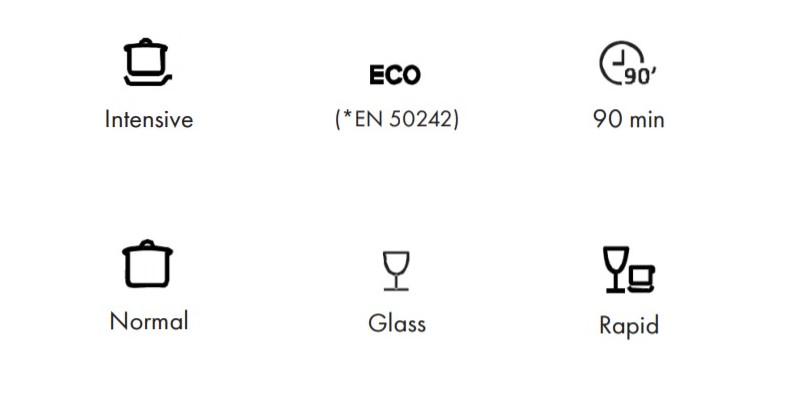
- Intensive – For heaviest soiled crockery, and normally soiled pots pans dishes etc with dried on soiling. This cycle takes 140 minutes and uses 10 litres of water.
- Normal – For normally soiled loads, such as pots, plates, glasses and lightly soiled pans. This cycle takes 120 minutes and uses 8 litres of water.
- ECO (*EN 50242) – For normally soiled tableware. This cycle takes 180 minutes and uses 6.5 litres of water.
- Glass – For lightly soiled loads, such as glasses, crystal and fine china. This cycle takes 75 minutes and uses 7 litres of water.
- 90 min – For lightly soiled crockery and glass. This cycle takes 90 minutes and uses 7 litres of water.
- Rapid – A shorter wash for lightly soiled loads and quick wash. This cycle takes 30 minutes and uses 6 litres of water.
The rinse-aid refill indicator can be seen below the program symbols on the left-hand side, and the salt refill indicator can be seen below the program symbols on the right-hand side.
Klarstein Amazonia 6 Error codes
The following error codes may flash on the front display:
- E1 (Longer inlet time) – Faucet is not opened, or water intake is restricted, or water pressure is too low
- E4 (Overflow) – Some element of dishwasher leaks. If overflow occurs, turn off the main water supply before calling for a service. If there is water in the base pan because of an overfill or small leak, the water should be removed before restarting the dishwasher
White Knight DW1460WA: Dishwasher Symbols and Error Codes
Let’s focus on the control panel which is annotated in the above diagram with the number 3 (apologies for having to squint, but White Knight does not have a larger or higher quality image to use!).
There are 14 symbols altogether, starting from the top row from left to right:
- #1 Half load function indicator: (1/2 indicates the half load function has been selected)
- #2 – #7 Programs: Intensive, Normal, Eco, Glass, 90 min, Rapid
- #8 Water faucet indicator: Indicates there is no water supply to the appliance
- #9 Rinse Aid symbol: Indicates when the dispenser needs to be refilled
- #10 Add salt indicator: Indicates when the dispenser needs to be refilled
- #11 – #14 Delay time: Indicates that a delay time has been set, which can be cycled through as 3h 6h 9h 12h
Other button functions as annotated above:
- On/Off Button: To turn on/off the power supply
- Half Load Button: Select when washing 7 or less place settings. This will use less water and electricity
- (As already mentioned above)
- Delay Button: To cycle through the 4 available delay times
- Program Button: To cycle through and select which program to use
- Start/Pause button: To start the selected washing program or pause the washing program when the machine is working
White Knight DW1460WA Errors, Beeps and Flashing Lights
The Rapid program light flashes
Longer inlet time. Faucets are not opened, or water intake is restricted, or water pressure is too low.
The Glass program light flashes
Overflow. Some element of the dishwasher is leaking. If overflow occurs, turn off the main water supply before calling for a service. If there is water in the base because of an overfill or small leak, then the water should be removed before restarting the dishwasher.
Indesit DIF 04B1: Dishwasher Symbols and Error Codes
The Indesit DIF 04B1 is an integrated dishwasher with a minimal control panel display.
The image of the control panel above shows the available dishwasher programs, as follows:
The ECO wash cycle is the standard cycle to which the energy label data refers.
It can be used to wash crockery with a normal soil level and is the most efficient cycle in terms of energy and water consumption for this type of crockery.
Heavily soiled dishes and pans (not to be used for delicate items).
Normally soiled pans and dishes.
Pre-wash while awaiting completion of the load with the dishes from the next meal. No detergent is needed for this program.
There are no salt or rinse-aid indicators on the main panel. These indicators can be seen next to each dispenser.
Indesit DIF 04B1 Errors, Beeps and Flashing Lights
Beeps are emitted (in some models), and all the cycle indicator lights flash
There is no water in the mains supply, or the water inlet hose is bent. Ensure the tap is turned on and the appliance will start after a few minutes.
The ON/OFF indicator light flashes rapidly, and the 2nd and 3rd wash cycle indicator lights flash
The appliance lock has been activated because no action was taken when the beeps sounded.
Switch off the machine using the ON/OFF button, turn on the tap and switch the machine back on after a few seconds by pressing the same button.
Re-program the appliance and restart the wash cycle.
Bosch Serie 2 SPV25CX00G: Dishwasher Symbols and Error Codes
There are a number of different Bosch models available in the Serie range, with Bosch Serie 2 being the best buy, but Bosch Serie 4 and Bosch Serie 6 being great additions for those looking to spend a little extra.
One thing that is pretty obvious with the Bosch Serie range is that their freestanding models are much easier to understand.
This is because the control panel area is much larger, and therefore Bosch have opted to use the space to label each button and light clearly.
I would hazard a guess that if you’re currently Googling “What do the Bosch Serie dishwasher symbols mean?”
Then chances are you are struggling with the integrated version of the machine, which has a much more limited space, and relies on a symbol only panel face, with no text to explain each option.
If you have read the entire article up to this point, then you should have likely already covered most of the indicators in the above diagram.
There are only a couple that haven’t been covered so far (7 and 8).
The list below describes the function for each button and indicator in the previous Bosch Serie 2 diagram:
- ON/OFF switch
- Set delayed timer
- Additional options (see below)
- Displays which program is selected
- Select program (cycle left)
- Select program (cycle right)
- Indicates the appliance is in the cleaning phase
- Indicates the appliance is in the drying phase
- START button
- Rinse aid refill indicator
- Salt refill indicator
- ‘Check water supply’ indicator
Bosch Serie 2 Additional Options (Button #3)
The additional options that can be triggered by button 3 are as follows:
Express Wash / Speed Perfect / (VarioSpeed)
This function can reduce the running time by approx. 20% to 50% depending on the selected rinse programme.
To obtain optimum cleaning and drying results at a reduced running time, water and energy consumption are increased.
Intensive zone
Perfect for a mixed load. You can wash very soiled pots and pans in the lower basket together with normally soiled utensils in the upper basket.
The spray pressure in the lower basket is intensified, the rinsing temperature is increased slightly.
Hygiene
The temperature is increased during the cleaning process. This increases the hygiene status. This additional option is ideal for cleaning e.g. chopping boards and baby bottles.
Half load
If you have only a few items to wash (e.g. glasses, cups, plates), you can switch to “half load”. This will save water, energy and time.
It is recommended to put a little less detergent in the detergent dispenser than for a full load.
Extra drying
An increased temperature during the final rinse and an extended drying phase ensure that even plastic parts dry better. There is a slight increase in energy consumption.
Other popular Articles
- 17 Best Stovetop Kettles For Gas Hobs That You Need [2023]
- UK Dishwasher Dimensions and Sizing Guide
- When Was the Dishwasher Invented (The Real Truth)

Founder of homeappliancegeek.com, avid cook, and lover of Asian food.
Signature dishes include Thai Red Curry, Chicken Saag, Bibimbap and Sushi.
Massive clean freak; a habit baked-in after spending 9 years in the catering industry.
The one appliance he couldn’t live without? Easily the dishwasher (total relationship saver!).